Vibecoding Over The Weekend - Building Apps with AI Agents
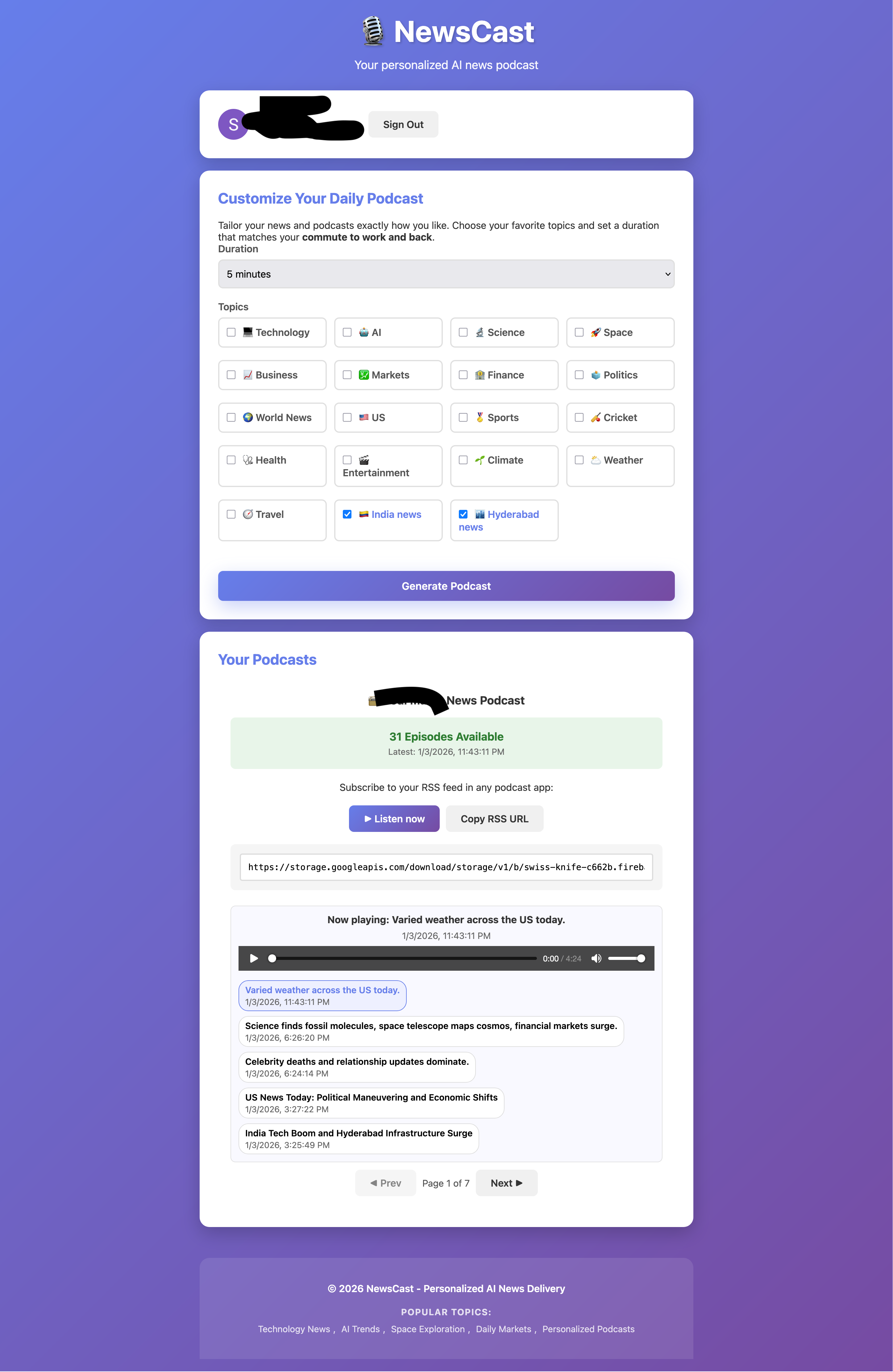
Over the weekend, I decided to dive into some coding projects that had been on my mind for quite a while. I wanted to experiment with a few ideas that I believed could enhance my workflow and overall coding experience. The first one was having a one-stop landing page for various astronomical events like sunrise and sunset times, moon phases, and other celestial occurrences. Also wanted to keep track of Indian calendar details like zodiac signs. The second one was to create a personalized news podcast that curates news based on my interests and reads them out loud. I wrote about the mechanism earlier in Medium. Now I wanted to productize it.
Let’s Look at the Process
For the astronomical landing page, the first thing I did was get a good subdomain name. Firebase gives out .web.app subdomains so the choice of hosting was easy. It’s just a static site (for now) so the entire logic is in JavaScript. I used Antigravity for coding and let it run in “Fast mode” and occasionally just approved commands. It by default gave a mobile-friendly page which I am ok with because people mostly would launch this on mobile.
Initially the prompt was something very basic like “Create a landing page that shows astronomical events like sunrise and sunset times, moon phases, and other celestial occurrences. Also include Indian calendar details like zodiac signs.” This was a good start but had a lot of numbers on the page. I wanted more visual indicators like a progress bar showing things like how far the day or night has progressed before the next sunrise or sunset.
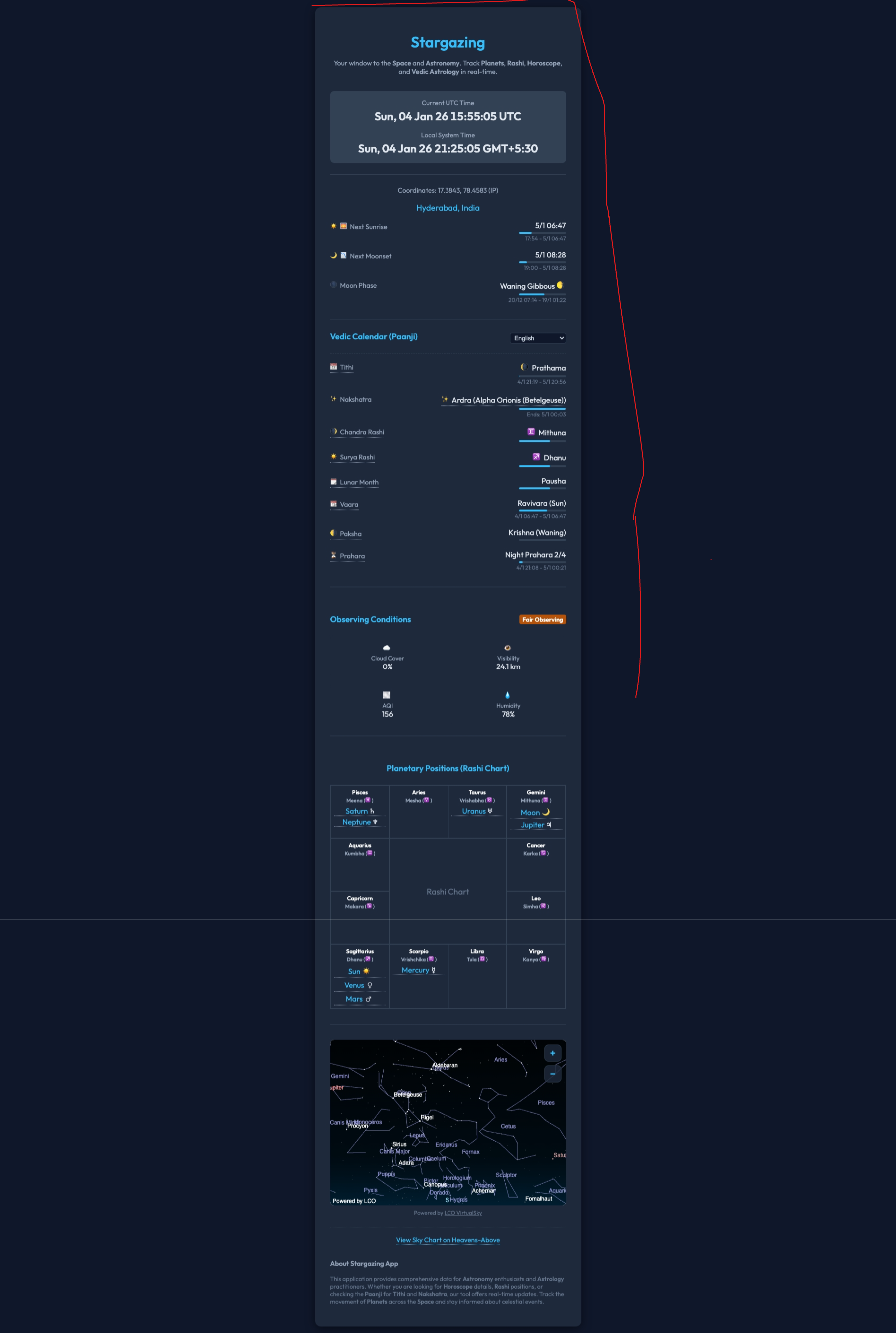
The good thing about Antigravity was that it can fire up the Chrome agent and launch the app locally and take a screenshot to check if it has implemented correctly and iterate if required. While iterating I realized occasionally it breaks the working functionality while implementing new things. For example, while implementing the planetary chart it ended up messing up the embedded sky chart. So I decided to create a snapshot of features using markdown file based on the current feature (especially describing the functional UI components like progress bars and the start and end time). This markdown file could just be my reference to the coding agent for regression testing and make sure they always keep working when new features are added.
The Good and Bad
While I am really glad that I could implement it in a matter of 5 hours, I think at the same time I feel I am not aware of the code structure and where to fix minor bug fixes if needed (without any AI tool help). It’s less likely I will have to do any changes without an AI coding tool’s help. It’s just I am not sure how maintainable this code would be in the long run. I guess I will have to wait and see how it goes.
For example, I wanted the sky map to be zoomable but Antigravity wasn’t able to implement it, though I gave a lot of feedback over and over. It just implemented the wheel scroll event and plus/minus buttons which don’t work because when you scroll the wheel the entire page scrolls. Even it could not implement the multi-touch way of being able to zoom on a touch device like mobile. I know with correct guidance it would be able to implement correctly eventually, but the problem is I don’t know much about the exact code where these JS components are implemented in the codebase so that I could give the context to the coding agent like tagging the exact file and function name.
This is a drawback I think for the future where we are getting super dependent on autonomous agents. This was not really a problem when we copied and pasted code from the chat window, at least the code was in our visual range and our brain could recall it. Possibly I should give it a prompt such that it generates an architecture diagram going through the current implementation and I try to understand it by going through it.
Running Out of Quota
The second biggest issue was that I ran out of quota for Antigravity. I had to wait for the quota to reset on Monday morning to continue working on the news podcast app.
Now what pic.twitter.com/nMXUx0kPkB
— Neil Ghosh (@neilghosh) January 3, 2026
So I moved to good old GitHub Copilot where I happen to have a very large quota (if not unlimited). It’s good but I won’t have the browser agent so I would mostly give the feedback manually by looking at the rendered UI. Also the news podcast app was a bit complex instead of simply a client UI. I have a few services running in cloud functions written in Python and a JS client calling them. It has authentication implemented and CORS handling. So simulating all this locally with emulator was difficult (which is the right thing to do for quicker iteration), so I mostly relied on re-deployment in the cloud. While the Firebase site hosting was quick to be redeployed, deploying Gen 2 cloud functions was time consuming (although multiple functions were deployed in parallel). So the iteration cycle was a bit slow.
At some point I did get the Antigravity quota reset (even using a different model gives you some more time with Antigravity) but the browser agent quota was still not available.
How do people automatically push feedback (and update instructions for future improvement) from autonomous agents every time they fail or take too long to execute?
— Neil Ghosh (@neilghosh) January 2, 2026
This should definitely be easier than traditional systems that require source-code changes with correct syntax.
What I Learned
While creating the news podcast app I learned that it’s always better to let the AI agent itself write the prompt that we use in the runtime inside the app (while calling Gemini API to generate news transcript and audio). My handwritten prompt was not very efficient although the intent was clear. So it’s more efficient to give the AI agent the intent which creates the prompt which in turn is used in runtime to get AI API output.
This is why it’s also wise to generate the copilot-instructions.md file (or any other Agent.md file if you are using other tools like Claude Code) using Copilot itself just by giving the intent in your own version of English. Over a period of time, even to enhance the instruction file I give a prompt like “Summarize the learning from the current chat session and update the instructions file such that it can get the correct result in one shot next time. Examples should be generalized and not specific to the task in hand.” This “upserts” the new instructions properly in the existing instructions file.
Sometimes I also issue the following prompt “Make the instructions file (add the file in context) concise and to the point by removing any redundant information.” This way the instruction file does not bloat over a period of time.
What I Want for the Future
Ultimately, though I got good results, I would like to “engineer” these kinds of development tasks using autonomous agents instead of random back and forth in the chat window. When I say “engineer”, I mean there has to be a proper process to provide the initial intent and generate a plan and try to visualize what it would make and then create the first version say “pre-MVP” and there has to be a mechanism to provide persistent feedback and enhance the plan which would again automatically create the desired version and so on.
In this way since my requirements would always be built progressively it’s unlikely it will regress and also it would have a blueprint handy for a new engineer or even myself in the future to understand the code structure and be able to fix minor issues without much help from an AI coding agent.
Probably spec-driven development is the answer to this. More about this in another post when I explore more.
There were non-functional requirements like Google Analytics integration, SEO optimizations, dark mode etc which are common across projects, I could implement in one shot with minimal instructions. This gives developers time back to focus on building things which are unique to the app instead of spending time on plumbing work.
Try the Apps
Do let me know your thoughts about the following:
- Stargazing App: https://stargazing.web.app
- News Podcast App: https://newscast.web.app